| 1 | General observations. Pay attention to ports, clean them with a brush, check hinges. |
|
| 2 | Make sure that all batteries, covers and buttons are in place, Attach a check list, take a notice. |
|
| 3 | If it is possible, upgrade RAM memory to 4 GB or more. |
|
| 4 | Run RAM memory test, check temperature of the bottom. |
|
| 5 | If it is hot, dismantle and clean the cooling radiator and fan. If it is noisy, apply oil inside the fan. If needed, replace thermopaste. |
|
| 6 | Take a notice of result of tests |
|
| 7 | Run HD regenerator, check temperature of the bottom. |
|
| 8 | If needed or if the processor is too weak replace HD to SSD |
|
| 9 | Install OS W10, UK language |
|
| 10 | Right click on open field > personalize > Themes > Desktop items > Computer, User Files, Recycle bin, Control panel Need to be ticked. 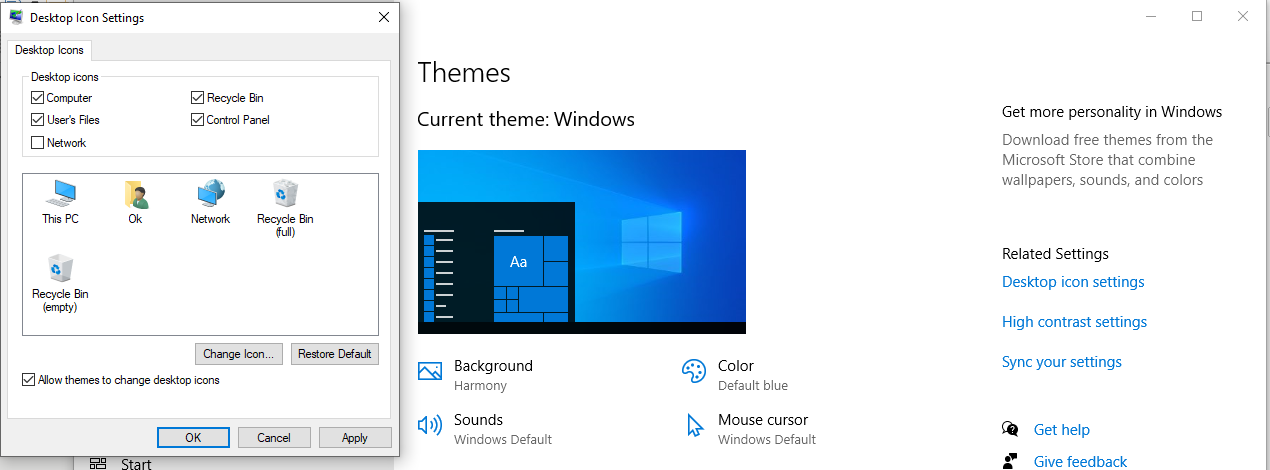 |
|
| 11 | Pin Internet explorer to taskbar, set home page as www.google.ie |
|
| 12 | Connect to internet; check date, time, region and activation. |
|
| 13 | Download and install Chrome, set home page as www.google.ie |
|
| 14 | Icon “This PC“: Right click > Manage > Device Manager > if needed, install drivers from Driver Pack or from manufactures website |
|
| 15 |
Test
camera, microphone, speakers, keyboard Disconnect battery, check time and date. |
|
| 16 | Change power settings on battery - 1 hour. |
|
| 17 | Test battery, run video on YouTube. Make notice of time |
|
| 18 | Make sure Windows Defender is active and no errors | |
| 19 | Clean exterior plastic and screen. |
|
| 20 | Make label – price tag, print and publish online – website + Instagram + Facebook + |
|
046-90-60-418 / 085-752-22-22 Open Mo-Fri 9am - 6pm. Sat 11am - 5pm
info@navanpc.ie